# How to Pin and Link Embroidery Designs on Pinterest
Did you know that 96% of top search queries on Pinterest are unbranded? Crafters are actively hunting for specific project themes like floral motifs, game day patches, and cartoon characters rather than corporate brand names. Even so, it's easy to feel stuck between repinning existing posts and managing direct links across community boards. Learning the exact steps to create a Pin for Pinterest and Linking to others boards solves this confusion while protecting your creative traffic from broken URLs.
You will discover how to publish high-converting pins and route them seamlessly across niche boards, connecting eager makers straight to instant-download digital embroidery designs. We'll cover optimal image formatting, multi-board scheduling rules, and smart board architectures that turn your catalog into an organized powerhouse of daily project inspiration.
- Learn the correct steps to format a Pin for Pinterest and Linking to others boards to expand your reach across personal collections and collaborative community spaces.
- Route clean, transparent URLs directly to instant-download machine embroidery designs so fellow crafters can access stitch-ready files without navigation friction.
- Leverage thematic group boards strategically to place specific project styles in front of engaged makers without triggering platform spam filters.
- Organize dedicated board sections by themes like sports, cartoon motifs, and BX fonts to build an evergreen visual catalog that inspires new stitching projects.
Table of Contents
Understanding How to Pin on Pinterest and Link Across Multiple Boards
At its core, pinning functions as saving a visual bookmark that routes directly to an external website. Built on Pinterest's visual pinboard platform, this mechanism allows machine embroidery enthusiasts to index stitch projects visually while storing direct links to instant-download digital files. When you master creating a Pin for Pinterest and Linking to others boards, you transform static images into direct pathways to downloadable patterns.
Crafters use multi-board distribution to organize expansive pattern libraries across specific themes. Instead of dumping every project onto a single generic board, grouping designs into dedicated spaces—like sports motifs, cartoon characters, and seasonal fonts—ensures other makers find the exact embroidery files they need for immediate stitching.
How Board Collaboration and Direct Pin Linking Function in 2026
Pinterest's search engine prioritizes visual freshness and contextual relevance over sheer volume. Using board collaboration and cross-board sharing correctly ensures your digital embroidery designs reach targeted craft audiences without triggering algorithmic penalties:
- Collaborative Group Boards: Group board owners invite contributors to pin topical designs, giving your machine embroidery patterns immediate exposure to thousands of active hobbyists.
- Targeted Destination Routing: Clean URLs point directly to download pages in the embroidery categories catalog, eliminating search friction for buyers.
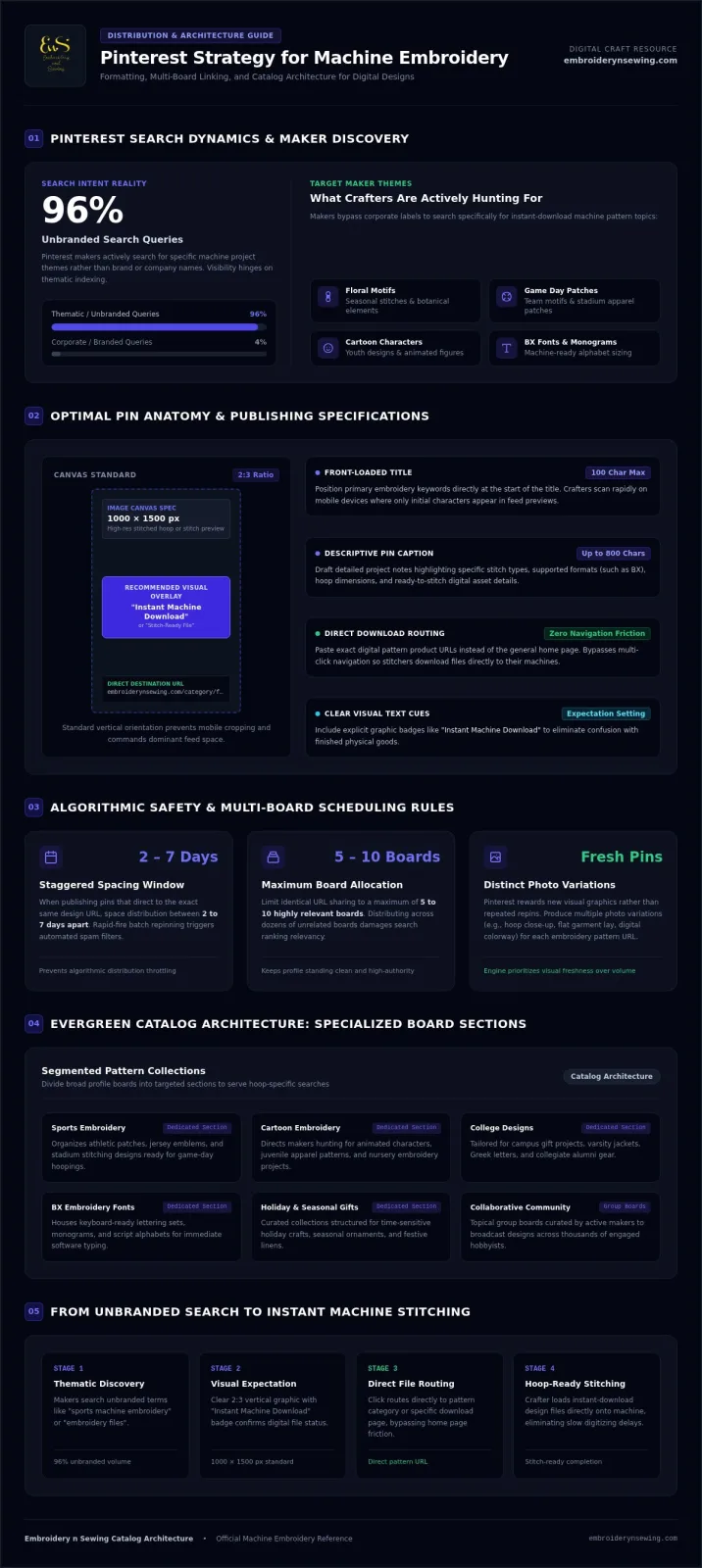
- Fresh Pin Prioritization: Pinterest rewards fresh visual graphics rather than duplicate repins. Distribute distinct photo variations of the same design to separate, relevant boards spaced 2 to 7 days apart.
Understanding these collaborative structures makes it easy to position your needlework files directly in front of crafters seeking ready-to-stitch digital files.
![Pin for Pinterest and Linking to others boards]
Guide to Creating Pins and Linking to Group Boards
Transforming machine embroidery projects into high-traffic pins requires a methodical publishing routine. Start by designing a vertical graphic using the standard 2:3 aspect ratio at 1000 by 1500 pixels. High-resolution imagery of your stitched hoop or detailed digital preview ensures your work stands out in dense user feeds. Upload the image directly into the pin builder, enter a front-loaded title within the 100-character limit, and draft a descriptive caption up to 800 characters focusing on specific machine embroidery designs.
Accurate destination routing is essential when formatting a Pin for Pinterest and Linking to others boards. Paste the exact URL of your instant-download digital pattern rather than a generic home page. This eliminates navigation friction, sending crafters directly to stitch-ready files. If you need inspiration for your next project pin, explore the latest stitch patterns at Embroidery n Sewing.
Joining and Pinning to High-Impact Craft Community Boards
Reaching new stitchers requires structured community distribution. Focus on strategic placement across specialized boards rather than blasting general craft spaces:
-
Find Targeted Boards: Search terms like "embroidery files" or "sports machine embroidery" to find collaborative boards managed by active makers.
-
Follow Group Guidelines: Review contributor instructions pinned in board descriptions to match daily upload caps and design themes.
-
Space Your Submissions: Practice strategic organizing pins across boards by spacing pins linking to the exact same URL by 2 to 7 days across a maximum of 5 to 10 relevant boards.
This steady workflow keeps your profile in good algorithmic standing while connecting relevant pattern collections directly with motivated creators.
Best Linking Practices to Drive Embroidery Design Traffic
Clear visual cues turn casual pin scrollers into active project creators. Adding concise text overlays such as "Instant Machine Download" or "Stitch-Ready File" sets clear expectations before someone clicks. Pair these visual cues with direct product URLs to eliminate unnecessary browsing steps. When executing a Pin for Pinterest and Linking to others boards, structure your profile around highly specific board sections. Dividing a primary board into focused collections like college embroidery designs, sports embroidery, and cartoon embroidery designs helps makers instantly find files tailored to their hoops.
Turning Saved Pins into Active Machine Embroidery Projects
Seamless linking transforms casual visual bookmarks into completed machine projects. Route your pins directly to comprehensive embroidery designs collections so crafters bypass slow custom digitizing and jump straight to stitching. When guiding crafters who plan holiday or seasonal gifts, don't send them to a generic catalog; link your pins to curated embroidery patterns ready for instant download.
Makers can browse vast digital libraries on Embroidery n Sewing to find fresh project inspiration across niches like car logos, BX fonts, and flower embroidery designs. Maintaining clean destination links protects your account from spam flags while ensuring needleworkers get uninterrupted access to the digital files they need.
Start Organizing and Sharing Your Embroidery Pins Today
Mastering your creative publishing workflow for a Pin for Pinterest and Linking to others boards turns casual browsing into active stitching. Establishing dedicated thematic boards ensures every crafter discovers the right pattern without navigation friction. When you pair crisp 2:3 graphics with direct destination links across relevant community boards, you connect directly with motivated makers searching for fresh ideas.
Instant digital download access allows makers to begin stitching immediately without waiting on physical shipments or paying for costly custom digitizing. Explore Instant-Download Embroidery Designs on Embroidery n Sewing to browse an expansive catalog spanning sports, collegiate, cartoon, and seasonal motifs. Organize your boards, link each design with confidence, and start stitching your next project today.
Frequently Asked Questions
How do I save a pin directly to someone else's Pinterest board?
You can't save a pin directly to another user's personal board unless they invite you as an approved collaborator. When managing a Pin for Pinterest and Linking to others boards, you must receive an invitation from the board owner first. Once you accept, that group board appears in your board selection dropdown during regular pin publishing.
Can you link one Pinterest pin to multiple boards simultaneously?
You can't publish one pin to multiple boards at the exact same time through native Pinterest tools. Instead, save your pin to the most relevant theme board first, then schedule or pin to secondary boards across spaced intervals. Spacing your saves over several days keeps your account healthy and avoids triggering automated spam filters.
What is the difference between a personal board and a collaborative group board?
A personal board belongs strictly to your account, while a collaborative group board allows multiple invited creators to add content to one shared space. Personal boards work best for cataloging specific themes like BX fonts and sports embroidery. Group boards expand your distribution by displaying your digital embroidery designs to another creator's existing community.
What happens if the destination link on my Pinterest pin is broken?
A broken destination link leads users to error pages, which causes Pinterest's algorithm to demote your pin in visual search feeds. Stitchers who click won't reach your intended file listing, interrupting their shopping experience. Always verify your landing page URLs and avoid link shorteners so crafters smoothly land on active digital pattern files.